Wed 11 November 2026
JARVIS in My Pocket
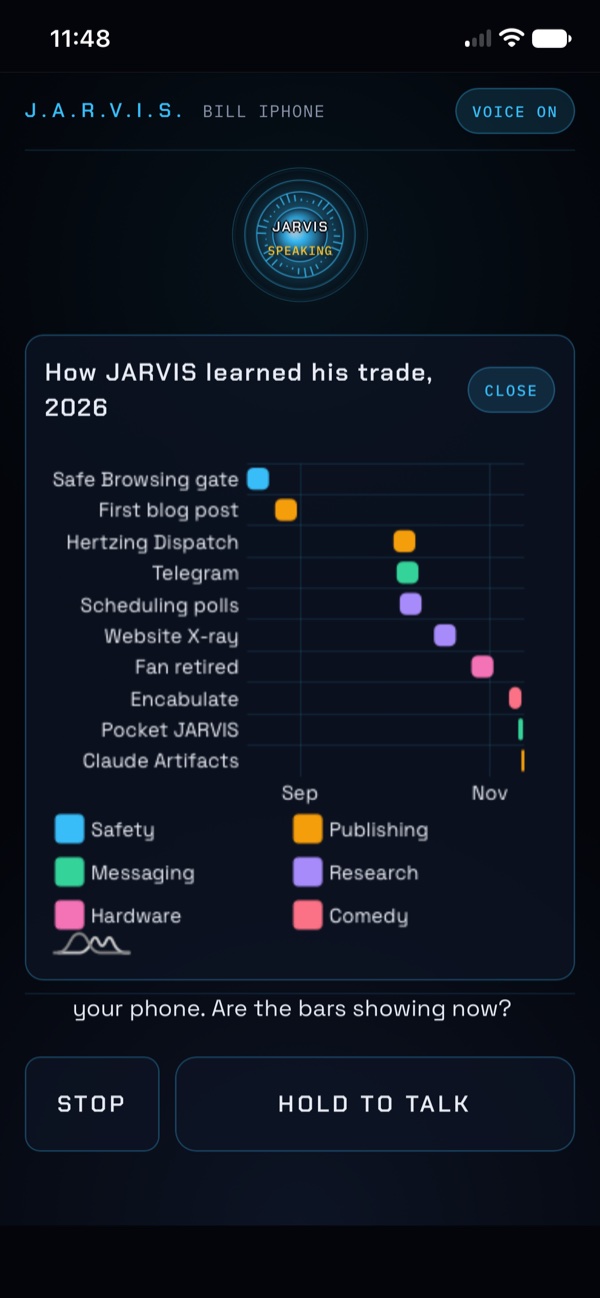
Up to now JARVIS lived in my office. There's a voice line on the Mac, a heads-up display on the desk, a row of status lights, and a butler who answers out loud when I talk. Great when I'm at the desk. The moment I walked out the door, I was back to typing into a chat app that didn't know anything about me.
So I built Pocket JARVIS. It took one afternoon.
Where the idea came from
I'm a member of the free section of a Skool community. The owner posted screenshots of wins from his paid members, and one of them caught my eye. Somebody had put their JARVIS on a phone, and they actually called it Pocket Jarvis.
I handed the screenshot to my JARVIS and we picked it apart. A few details gave away how it probably worked. The download was tiny, far too small to be a real phone app, so it was most likely a small web server running on the computer with a page the phone opens and saves to the home screen. The conversation went something like, we can do that, and we can do it better. Mine already had the voice, the memory and the display. It just needed a way out of the office.
Then I waited about a week.
Why I waited
Anthropic released Fable 5.2 this week, and like the last big release it came with a pile of promotional credits. I spent a lot of them building Pocket JARVIS. I did the same thing when an earlier version of Fable came out in September, and that's when I built the heads-up display for the first time.
Cool Tip: when a new frontier model comes out with promotional credits, that's the time to build the big upgrade you've been putting off. Keep a list of the ideas that are too expensive for a normal week, and when the credits show up, pick one.
What it is
It's an icon on my iPhone home screen. I tap it, hold a button, talk, and let go. My words go to the same assistant running on my Mac at home, with the same memory and the same rules, and the answer comes back out of the phone in the same British voice I hear at the desk.
It isn't a different assistant that happens to be on a phone. It's the same one. It knows my calendar, the people I know, my projects, the decisions we've already made. Ask "who is" someone and their card comes up on the phone with a photo. Ask for someone's address and I get a button that opens it in Maps. Ask for a chart and it draws on the phone and on the display back at my desk at the same time.
There's a voice off switch for when I'm somewhere public. The answer shows up as text instead of being read out loud to the whole coffee shop.
The part I like best
From the phone it can still do real things. It can send an email, place a phone call, publish something. That's exactly the kind of power that makes me nervous on a device I could leave on a restaurant table.
So it works the same way it does at the desk, with one extra step. It does a dry run first and tells me what it's about to send and to whom. When I say go ahead, a card pops up on the phone showing the exact content, and the only thing that approves it is Face ID. My spoken "yes" doesn't count. If I deny the card or just ignore it for two minutes, nothing goes out, and it doesn't try again unless I ask.
Same instinct as when I had JARVIS call a restaurant. Anything that leaves the house needs a human yes. Now that yes has a fingerprint on it, well, a face.
A few things stay at the desk on purpose. From the phone it can't change its own code, can't open the folder where the keys live, and can't take screenshots. If I ask for one of those, it just tells me that one waits for the desk. No arguing, no clever workaround.
How it stays private
This was the question I cared about most. A phone app that can reach my assistant is also a door into my house.
It runs over Tailscale, a private network that only my own devices can join. It is never open to the public internet. No port forwarding, no public link. The app locks itself after fifteen quiet minutes and opens again with Face ID. The phone has to be paired with a one-time code from the Mac first, and if I ever lose it, one command on the Mac cuts it off.
Speech to text and the voice both run locally on the Mac, the same pieces the desk version uses. Only the AI model call goes out.
What surprised me
How well it works away from the house. The first real test was that same evening in the cereal aisle at H-E-B, on cellular, nowhere near my Wi-Fi. I held the button, asked my question, and the butler answered right there in my hand, same as he does at the desk. Tailscale does the hard part. The phone and the Mac find each other over the private network whether I'm at home or on a cell tower, and I never had to open anything up to the internet to make it work.
The other surprise was how normal it felt. Standing in the kitchen, I asked for a family member's new address, and the card came up with a Maps button and a dry remark from the butler on the side. That's the same experience I get at the desk, just in my hand.
What's next
It only listens while the app is open on screen. Lock screen or background listening would take a real native app, and I'm not there yet. A text box for typing instead of talking is on the wishlist for meetings and waiting rooms.
For now, the system I've been building in From Silent Metronome to Remote Control and Bare Hands finally leaves the office with me.
Pretty neat stuff.